After Effects MCP server, built into Flexile
Connect Claude, ChatGPT desktop, Cursor or another MCP app to After Effects. The AI reads your comp, animates it with Flexile’s easing, text engine, tools and audio, then checks the result.
It ships inside the extension, so there is nothing extra to install. Free during beta on macOS and Windows.
What is an After Effects MCP server?
MCP (Model Context Protocol) is the standard way AI apps call tools. An After Effects MCP server gives your AI app tools that act inside After Effects, so it can read a comp, set keyframes or animate text when you ask.
Since version 0.17.0, Flexile, our After Effects extension, includes an MCP server. Your AI app starts it on your computer over stdio, and it passes each request to the Flexile panel open in After Effects. It runs on the Node.js that comes with Flexile, so there is nothing to clone or build.
What can the AI do in After Effects?
The AI uses the same engines as the panel, on four of its pages:
- Animation. Eases keyframes with a CSS cubic-bezier or any of 37 named curves, in Bezier, Smart or Peak mode, and re-eases existing keys. More on Flexile easing curves.
- Text. The text engine’s 15 effects in In, Out or Keyframes mode, plus reveals by character, word or line.
- Tools. Quick tools, the Overshoot, Bounce, Flicker and Wiggle rigs on Transform and Text properties, and your own Script or Expression tools. The AI can also write new tools, and a script with a syntax error is refused instead of saved.
- Audio. Beat keyframes over MCP by frequency band, and captions over MCP from speech or from lyrics you give it.
Not covered yet: Elements, Learn, Settings and speech-model downloads. Add transitions from Elements yourself, and click Download once in Audio > Subtitles before the AI transcribes.
Tell your AI. Flexile animates.
Flexile now ships with an MCP server. Connect Claude, the ChatGPT desktop app, Cursor or any other MCP app, and it works right in your After Effects project with Flexile’s own easing, text engine, tools and audio. It reads the comp, builds the motion, checks it and looks at the result. You describe the shot; you don’t click through a single panel.
Set up in the panel’s AI page: one click for Claude Desktop and Cursor, one copied command or config for the rest.
- Claude Desktop
- Claude Code
- ChatGPT desktop
- Codex
- Cursor
- VS Code
- Zed
- Gemini CLI
Text, Animation, Tools and Audio work over MCP. The Elements panel isn’t supported yet, so add transitions from the Elements library yourself for now.
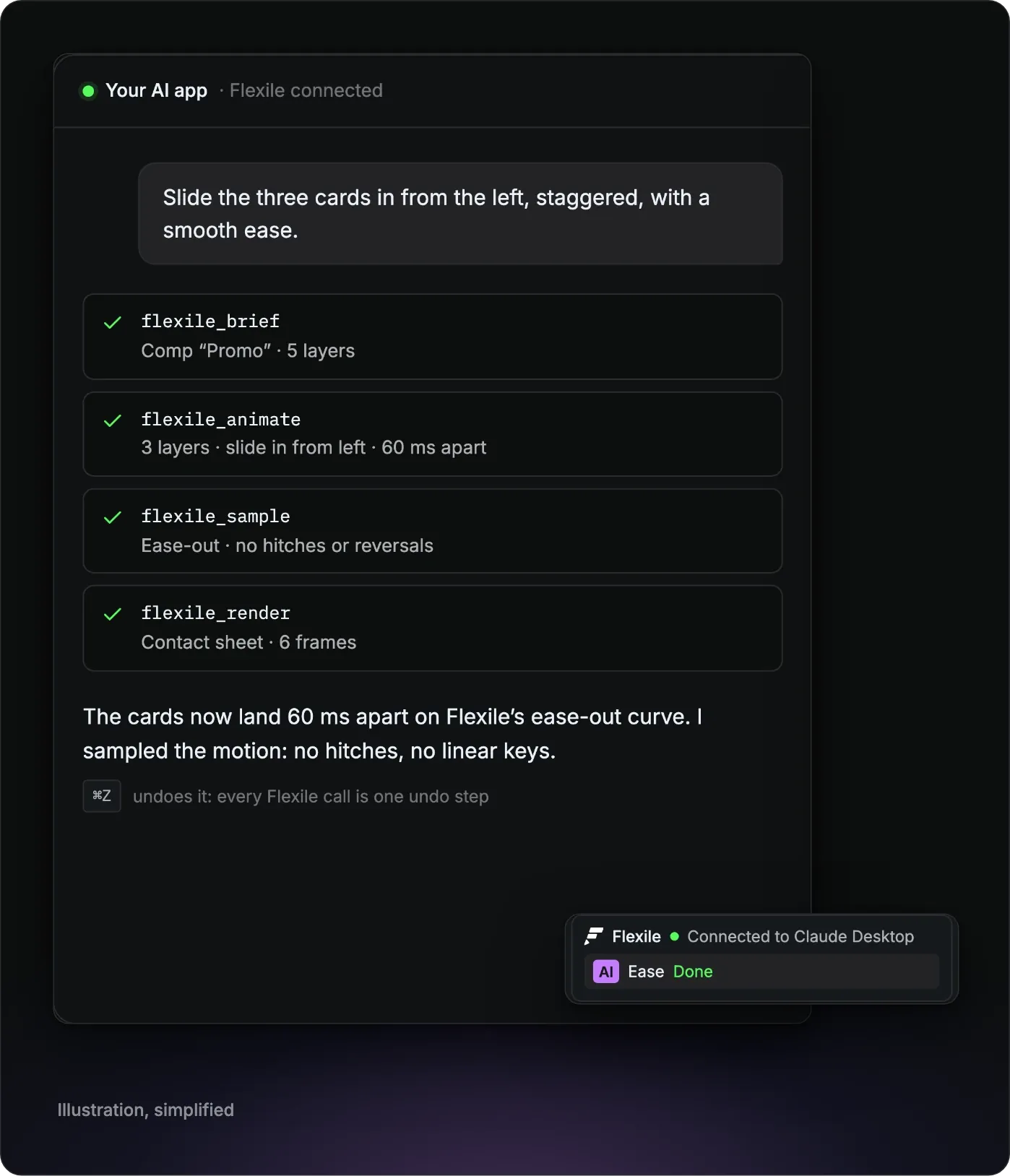
Illustration: the requests, tool names and results match what Flexile’s MCP does. The preview is simplified.
The 13 tools, grouped by job
The server exposes 13 tools. Your AI app picks them. You describe the shot.
Look before changing anything
flexile_brief: the first call. Opens a session and returns the active comp, motion rules and examples.flexile_state: the comp as compact text, with layers, timing, transforms and every keyframed property with its easing.flexile_catalog: operations, easing curves, installed fonts, text effects, tools and comp presets.
Make the change
flexile_animate: motion from intent such as “slide in from left” or “pop”, with curve, duration, stagger and motion blur chosen for you.flexile_text: text animation from intent such as “reveal word by word” or “type on”.flexile_do: one operation or a batch. Behind it sit 79 After Effects operations in 17 categories, plus 5 for audio and subtitles.flexile_tool: lists, creates, edits, runs and deletes your own tools. Built-in tools are read-only.
Check the result
flexile_sample: progress and speed at 11 points, with hitches and reversals flagged.flexile_validate: checks safe area, type size, contrast, linear easing, overshoot, simultaneity, fades, motion blur and reading time.flexile_render: a contact sheet of 6 frames by default, or single frames, plus a zoomed crop.flexile_screenshot: captures After Effects and its dialogs from the operating system, even when After Effects is frozen.
Get help
flexile_guide: Flexile’s motion-design manual, for apps without skill files.flexile_doctor: checks install, panel, sign-in, licence, scripting, rendering and screenshots, and tells you the fix.
Which AI apps can connect?
The panel’s AI page lists each app with the exact paths for your computer.
- One click: Claude Desktop and Cursor, re-pointed every time the panel starts. Claude Desktop’s config is backed up first and your other servers stay.
- Copied command: Claude Code, which also gets Flexile’s motion-design skill.
- Copied config: ChatGPT desktop and Codex CLI (they share
~/.codex/config.toml), VS Code, Zed, and JSON for apps such as Gemini CLI, Cline, LM Studio and Windsurf. - Set-up prompt: for any agent that can edit files or run commands.
Copied set-ups need redoing after a Flexile update moves the extension folder. Steps for each app: use Claude, ChatGPT or Cursor in After Effects. If you use ChatGPT, see ChatGPT and After Effects.
Undo, sign-in and the off switch
- One undo step per call. Each call is one undo step whose name starts with “Flexile AI”, so
Cmd+ZorCtrl+Zsteps back through what the AI changed. A batch of up to 200 steps is not transactional, so a failed step does not roll back the ones before it. - An off switch. Allow AI assistants, on the AI page and in Settings, is on by default. Switched off, the panel stops listening until you turn it back on.
- A local bridge. The server reaches the panel over
127.0.0.1with a token that changes on every panel start and never goes into your AI app’s config. - Checked every time. The panel checks sign-in and licence on every request, and shows an activity strip while the AI works.
- Guard rails. Saving can’t be undone, so Flexile tells the AI to save only when you ask, and it refuses to save over another project file. Scripts that open alerts or file dialogs, and changes to locked layers, are refused.
- What leaves your computer. Your AI app sends what the AI reads, such as the comp’s layers and a few preview frames, to its own model. Licence checks go to Flexile, tools the AI saves sync to your Flexile account, and the panel sends usage metrics and error reports. Audio analysis and speech recognition run on your computer.
The AI can run scripts in After Effects, so only paste prompts and instructions you trust.
How does it compare with open-source After Effects MCP servers?
Search for an After Effects MCP server and you get GitHub projects and the directories that list them. Flexile is our product. The other four below are MIT-licensed community projects: free, open to read and change, and each lists older After Effects versions than Flexile supports. All four need Node.js on your computer, and three add a bridge inside After Effects. From each README, checked 25 September 2026:
- Dakkshin/after-effects-mcp: After Effects 2022 or later, Node.js 14 or later, a ScriptUI bridge panel kept open. You clone and build it.
- Flexile: the server, its Node.js and the panel ship as one extension. It connects Claude Desktop and Cursor in one click and works through its own easing, text engine, tools and audio. The trade-offs: it supports After Effects 2025 or newer, needs a free account and can’t reach Elements yet.
- ishu86/after-effects-mcp: After Effects 2024 or later, Node.js 18 or later, a CEP extension.
- a-y-ibrahim/after-effects-mcp: After Effects 2022 or later, Node.js 18 or later, a ScriptUI bridge panel.
- kumoproductions/mcp-aftereffects: After Effects 2024 to 2026, Node.js 24 or later, nothing installed inside After Effects.
More options, from AI assistants to caption tools: AI plugins for After Effects.
What you need
Adobe After Effects 2025 or newer, on macOS or Windows
Flexile 0.17.0 or newer (see the installation guide)
A free Flexile account, signed in inside the panel: start for free
The panel open (Window > Extensions > Flexile for AE) with Allow AI assistants on
An MCP app. On macOS, screenshots need Screen Recording permission for that app, and you close After Effects dialogs yourself.
For captions: a Mac (Intel Macs need AVX2) or a 64-bit Intel or AMD Windows PC with SSE4.2 and the Visual C++ runtime
Do I need to install Node.js?
No. Node.js 22.17.0 ships inside the Flexile extension, with builds for Apple silicon Macs, Intel Macs and Windows. Your AI app starts the server with the command the panel’s AI page gives you.
Does it work with ChatGPT?
With the ChatGPT desktop app, yes. It uses a config you copy from the panel’s AI page, shared with Codex CLI. ChatGPT in a web browser can’t reach After Effects on your computer.
Is the Flexile MCP server free?
Yes. Flexile is free for everybody with an account during the beta, the MCP server included. Paid plans will be announced in advance on the pricing page and by email. Your AI app is a separate product. Its account and any paid plan come from its maker, not from Flexile.
What if my AI app can’t reach After Effects?
Keep the panel open, sign in, turn on Allow AI assistants and restart the AI app. Still stuck? Ask the AI to run flexile_doctor, which names the first step that fails.
Still have questions?
Write to us at contact@flexile.io.
More in Flexile
The same panel also does this, free during beta.
- Easing
Ease every selected keyframe at once: 26 presets, Peak and Smart modes.
- Text animation
Animate text by character, word or line with 15 effects.
- Transitions
Preview a transition, double-click to insert it and retime it to the cut.
- Beat sync
Turn the kick, the bass or any frequency band into keyframes.
- Auto subtitles
Turn speech or lyrics into subtitle layers with a model on your computer.
Free for everybody during beta
Every feature unlocked while Flexile is in beta, the MCP server included. No card, no trial.
After Effects 2025 or newer. macOS and Windows.