Shape morph for After Effects, without the twisting
Select your shape layers in the order you want them to morph, turn on Smart morph and click Apply. The first shape morphs cleanly through the others, colours included, with no twisting or spinning.
Already keyed a morph that folds over itself? Select its path keyframes and Apply with Smart morph on: the same keys now morph cleanly.
Free during beta on macOS and Windows. No card, no trial.
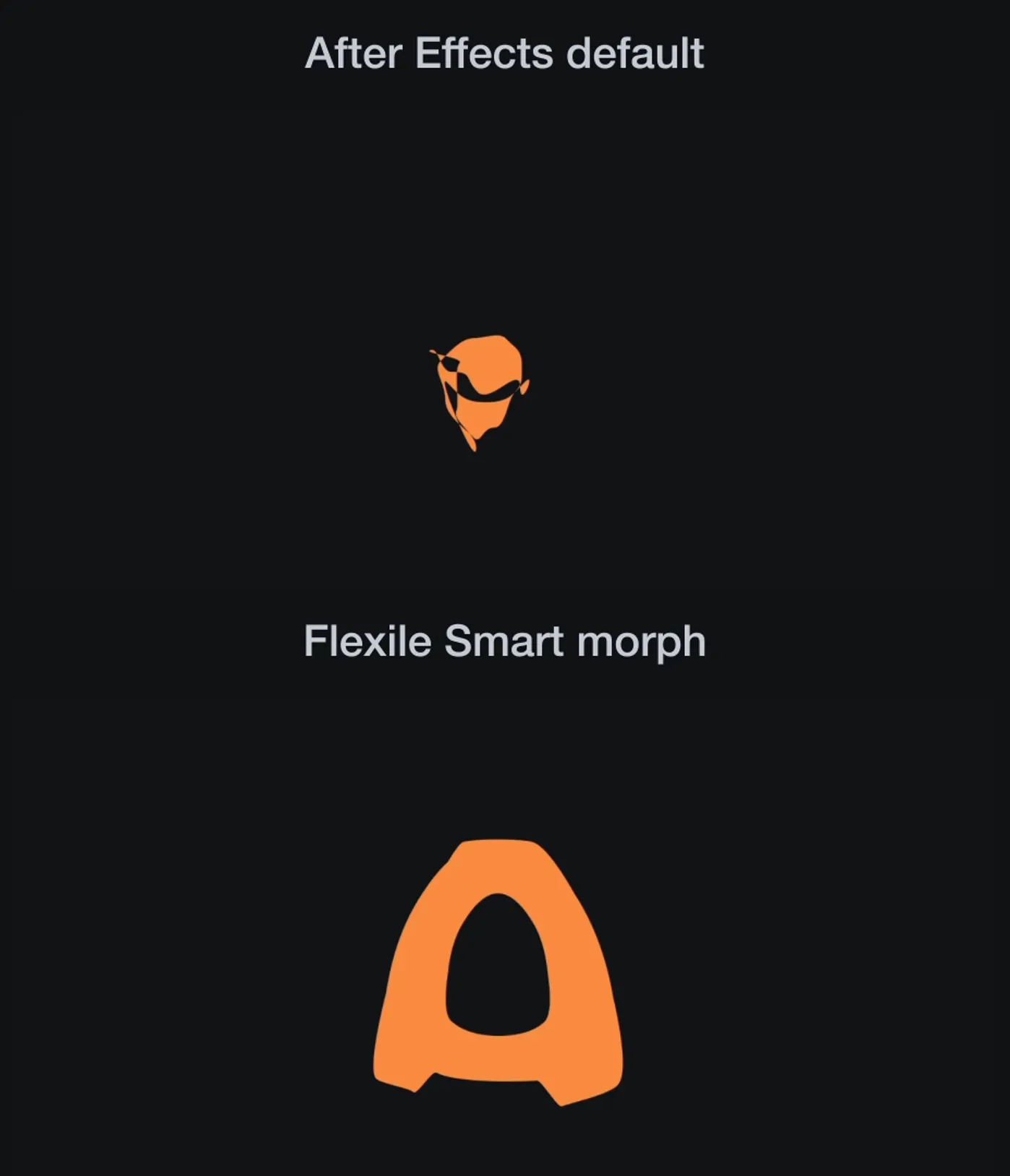
Morph shapes in After Effects in one Apply
Smart morph is the shape morph tool on the Animation page of the Flexile panel. To morph shapes in After Effects with it:
- Draw your shapes as shape layers: rectangles, ellipses, stars, or your own paths.
- On the Animation page, turn on Smart morph (the square-to-circle button).
- Click the layers in the timeline in morph order. Don’t select any keyframes.
- Pick a curve type if you want one (Bezier, Back, Elastic or Bounce) and click Apply.
The first layer gets one path keyframe per shape, 0.6 s apart from the playhead. Fill and stroke colour and stroke width follow each shape. The other layers are turned off, never deleted, so you can go back to them.
Why After Effects morphs twist, and what Smart morph changes
Paste one path onto another in After Effects and the outline often twists, crinkles or spins on the way, most of all between shapes with different numbers of points. The usual fix is manual: add or delete points and nudge the paths by hand until they agree.
Smart morph handles that for you when you click Apply, so a square turns into a circle or a star the way you’d draw it.
Morph chains: one shape through many
Select four, five or more shape layers and the first one morphs through all of them in sequence, picking up each shape’s fill and stroke as it goes. The keys are ordinary path keyframes: retime them like any others.
Clean up morphs you already keyed
Already have path keyframes on a shape or a mask? Select them, turn on Smart morph and Apply. Flexile lines the paths up and eases them in the same step, and says what it did, for example “Eased 4 keyframes and lined up 2 paths”.
Letters work too. Turn the text into shapes with Create Shapes from Text, key one letter’s path into another, and Smart morph cleans up the morph: the clip at the top of this page takes an O to an A, holes included, next to After Effects’ default.
Spring, bounce or overshoot into the next shape
Smart morph uses whatever curve the editor holds. Pick Back for a pop, Elastic for a wobble or Bounce for a landing. If an overshoot would fold an outline over itself, Flexile tones it down on that path and says so. More on Back, Elastic and Bounce easing.
Ask your AI to morph it
AI apps connected to Flexile can run the same Smart morph, with the same result as the panel. See AI for After Effects. A prompt to try:
Morph the circle into the star with a little overshoot.
Very detailed paths
Very dense paths take longer. Flexile asks before it starts and estimates how long After Effects may be busy, so you can proceed or cancel.
How Smart morph compares
Other ways to morph shapes in After Effects, from each official page, checked 26 October 2026. Flexile is our own product.
- After Effects’ own path morph: free and built in. You match the points by hand, and it can twist.
- Flexile Smart morph: one Apply, chains of shapes, colours follow, Back, Elastic and Bounce curves. Free during beta, After Effects 2025 or newer. It morphs 2D shape and mask paths, not 3D.
- Super Morphings (aescripts, sold through Toolfarm): one-click morphs with trails and a slicer. Its page lists After Effects CC 2018 to 2023.
- ShapeShifter AE (Mettle): 3D morphing and extrusion, a different job.
What you need
Adobe After Effects 2025 or newer, macOS or Windows
A free Flexile account: start for free
The extension, set up with the installation guide
Shape layers (rectangles, ellipses, stars and paths work as drawn), or path keyframes on a shape or mask
Free during beta, with paid plans announced in advance on the pricing page
Does Smart morph delete my other shape layers?
No. They’re turned off (the eye icon), never deleted.
Does the morph order follow my selection?
Yes. The order you click the layers in is the morph order.
Do colours and strokes morph too?
Yes. Fill and stroke colour and stroke width follow each shape.
Can I morph mask paths?
Yes. Select path keyframes on a mask and Apply with Smart morph on.
Still have questions?
Write to us at contact@flexile.io.
More in Flexile
The same panel also does this, free during beta.
- Easing
Back, Elastic and Bounce curves, speed editing and stagger.
- Text animation
Animate text by character, word or line with 15 effects.
- Transitions
Preview a transition, double-click to insert it and retime it to the cut.
- Scripts and expressions
Save scripts and expressions as one-click tools, or let your AI write them.
- Beat sync
Turn the kick, the bass or any frequency band into keyframes.
- Auto subtitles
Turn speech or lyrics into subtitle layers with a model on your computer.
- AI for After Effects
Ask Claude, ChatGPT or Codex to animate your comp with real keyframes.
- MCP server for AI apps
Let Claude, ChatGPT desktop or Cursor work in your After Effects project.
Free for everybody during beta
Every feature unlocked while Flexile is in beta. No card, no trial.
macOS and Windows