AI for After Effects: ask Claude or ChatGPT, get real keyframes
Describe the shot in Claude, ChatGPT or Codex. Your AI app animates your open After Effects comp with Flexile’s own tools: real keyframes, Bounce and Elastic eases, shape morphs, staggered layers and text animation you can edit afterwards.
Built into the Flexile panel, nothing extra to install. Free during beta on macOS and Windows.
What AI in After Effects can do with Flexile
Most AI tools for After Effects write you an expression or a script to paste. With Flexile, your AI app works inside your project and uses the same tools as the panel, so the result is what a designer would have keyed by hand:
- Ease anything: Bezier, Back, Elastic and Bounce, on selected keys, whole layers or shape paths. More on easing.
- Morph shapes cleanly, one into many, colours included. More on shape morph.
- Stagger layers along a curve.
- Build and edit shape layers: rounded corners, fills, strokes, dashes, trim paths.
- Animate text with the panel’s effects, and copy a text animation to other text layers.
- Markers: add, list and remove them.
- Beat and subtitles: keyframes from the music (beat sync), captions from speech (auto subtitles).
- Your own tools: run the Cloud Tools you saved, with settings.
Reliable enough to hand off a shot
Generic After Effects AI connectors make the model write new code for every request, and that is where jobs fail halfway. Flexile gives your AI app tested animation tools instead, so jobs finish in fewer steps with fewer failed calls.
- One Undo per request in After Effects 2025: one Cmd+Z (Ctrl+Z on Windows) takes the whole request back.
- Honest reports: if a step fails, it says nothing changed instead of claiming success.
- It checks its work: it can look at the frame and sample the motion before it says it’s done.
Prompts to try
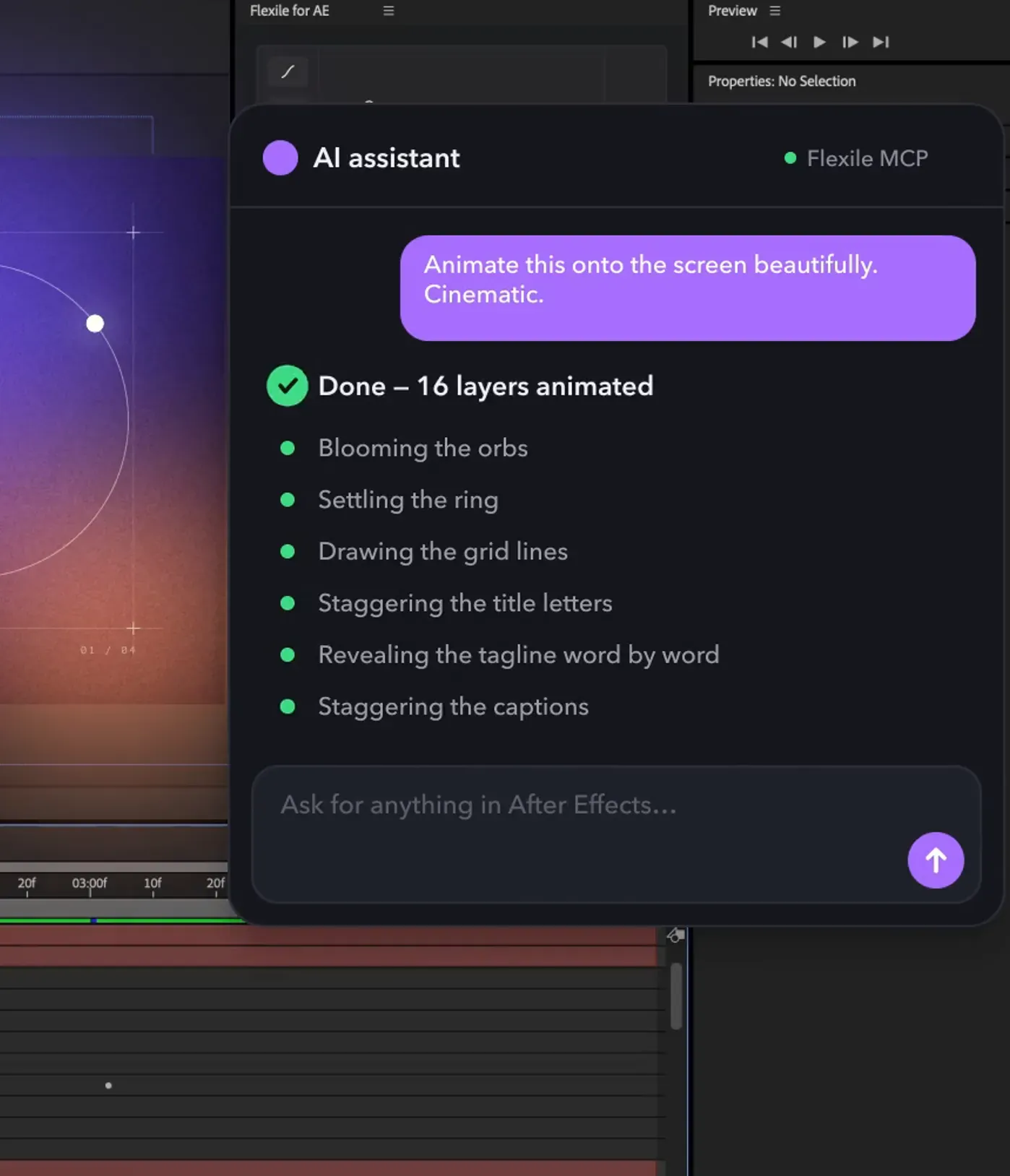
Type these into your AI app with a comp open. The clip at the top of this page is the first one, on a title card of 16 layers: the wait is sped up, the animation is what came back.
Animate this onto the screen beautifully. Cinematic.
Make the logo pop in with an elastic scale and fade the tagline up 6 frames later.
Stagger these eight bullet layers in from the left, ease-out, 3 frames apart, last one first.
Turn the play icon into the pause icon with a bounce, then add markers at every beat.
Connect your AI app in a minute
Open the AI page in the Flexile panel, pick your app and follow the steps. Claude Desktop and Cursor connect in one click; Claude Code, Codex and the ChatGPT desktop app get a command or a config to copy. Full steps for each app: use Flexile with Claude, ChatGPT and Codex. Technical details: the After Effects MCP server.
What it can’t do yet
Transitions from the Elements page and speech-model downloads are still yours to do in the panel. Very dense shape paths ask for confirmation first, as they do in the panel.
How Flexile compares with other ways to use AI in After Effects
Facts from each official page, checked 26 October 2026. Flexile is our own product.
- Expressions from ChatGPT: free; you paste the code and debug it. See ChatGPT for After Effects.
- Flexile: built into the panel, uses the panel’s tools from any MCP app, one Undo per request in After Effects 2025. Free during beta with a free account, After Effects 2025 or newer.
- Higgsfield AI Motion Designer: works from ChatGPT, focused on generated visuals plus animation. Needs Higgsfield, ChatGPT and After Effects subscriptions and uses credits.
- Open-source MCP servers: free and MIT-licensed, need Node.js and a companion panel, and the AI writes scripts. See After Effects MCP servers compared.
- AE GPT (Gumroad, $29): an assistant panel for expressions and scripts.
What you need
Adobe After Effects 2025 or newer, macOS or Windows
Flexile 0.19 or newer, signed in with a free account: start for free
An AI app that supports MCP: Claude Desktop or Claude Code, the ChatGPT desktop app or Codex, or Cursor
Your AI app’s own plan; Flexile itself is free during beta
Can Claude control After Effects?
Yes. Connect Claude Desktop or Claude Code to Flexile on the panel’s AI page, and Claude can animate your open comp with Flexile’s tools.
Does it work with ChatGPT or Codex?
Yes. The ChatGPT desktop app and Codex connect over MCP; the AI setup guide has the steps.
Does the AI write expressions into my project?
It uses Flexile’s tools and writes ordinary keyframes and layers you can edit. It can also save or run your own tools if you ask.
Can I undo what the AI did?
Yes. In After Effects 2025, each request is one Undo.
Do I need to install Node.js or anything else?
No. The connection ships inside the Flexile extension.
Is it free?
Flexile, the AI connection included, is free during beta. Your AI app’s own plan applies.
Still have questions?
Write to us at contact@flexile.io.
More in Flexile
The same panel also does this, free during beta.
- Easing
Back, Elastic and Bounce curves, speed editing and stagger.
- Shape morph
Morph shape layers into each other in one Apply, without the twisting.
- Text animation
Animate text by character, word or line with 15 effects.
- Transitions
Preview a transition, double-click to insert it and retime it to the cut.
- Scripts and expressions
Save scripts and expressions as one-click tools, or let your AI write them.
- Beat sync
Turn the kick, the bass or any frequency band into keyframes.
- Auto subtitles
Turn speech or lyrics into subtitle layers with a model on your computer.
- MCP server for AI apps
Let Claude, ChatGPT desktop or Cursor work in your After Effects project.
Free for everybody during beta
Every feature unlocked while Flexile is in beta. No card, no trial.
macOS and Windows