Animation Composer alternatives for After Effects (2026)
Motion Bro, Flexile, AEJuice, Spotlight FX and Transition Master 2 compared on library size, price and requirements. Prices checked in September 2026.
By Filip Miernik
Comparison
7 min read
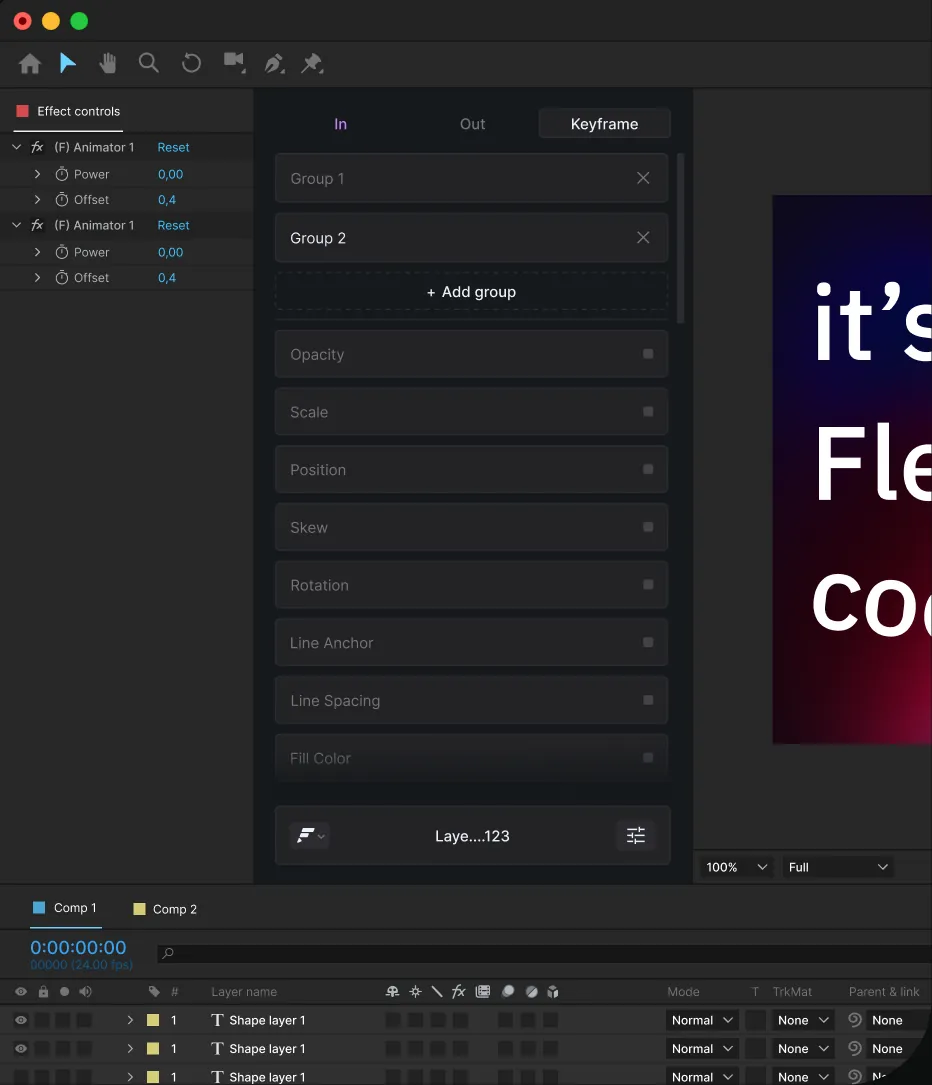
The closest Animation Composer alternatives are Motion Bro, AEJuice and Spotlight FX. Each gives you a free panel in After Effects and Premiere Pro, with paid packs or plans for the bigger libraries. Flexile, our own extension, ships far fewer assets and puts easing, a text engine, quick tools, an Audio page and a connection for AI apps in one panel, free during beta. Transition Master 2 is built around transitions.
Disclosure: we make Flexile. Everything about the other tools comes from their official pages, checked on 25 September 2026, and each section links to its source. We have not benchmarked them and we do not rank them by quality. Prices are in US dollars as the vendors listed them, before tax, and may change.
In this post
- What does Animation Composer include?
- Flexile (our product)
- Motion Bro
- Animation Composer vs Motion Bro
- AEJuice
- Spotlight FX
- Transition Master 2
- Which alternative fits your work?
- Is there a free alternative to Animation Composer?
What does Animation Composer include?
Animation Composer is a free plug-in from Mister Horse for After Effects, also available for Premiere Pro. Mister Horse says more than 1,000,000 motion designers use it. The panel browses animation presets, transitions, titles, graphic components and sound effects, and it can show your own compositions, MOGRTs, footage and audio. On the free plan, your own library holds up to 500 items.
On Mister Horse’s pricing page, as of September 2026:
- Free plan: over 1,000 assets and four free tools: Keyframe Wingman for easing, Keyframe Actions, Anchor Point Mover and Transition Shifter.
- Paid plan: over 6,000 assets for $19.90 a month, or $198 billed yearly ($16.50 a month).
- Commercial use is allowed on the free plan in the same scope as the paid plans. The licence is for one user, with up to two computers signed in at a time.
- It needs After Effects 2025 or newer and runs on Apple silicon Macs.
- What it adds are native After Effects layers and effects, so your projects open and render without the plug-in.
Flexile: a smaller library plus easing, text, tools, audio and AI (our product)
One alternative is Flexile, free in beta, the After Effects extension we make. It is not a preset store. If the size of the library decides it for you, pick one of the other tools in this post: the Animation Composer, Motion Bro, AEJuice and Spotlight FX libraries each list thousands of assets, and Flexile lists 100+ transitions.
Its transitions library, called Elements, works like a small preset browser: double-click an Element to insert it at the playhead, fitted to the comp, then retime it with Flexible Time Remap. Flexile’s case is the rest of the panel:
- Easing. The Animation page applies one bezier curve to every selected keyframe at once, on any number of properties, and re-eases keys you already have. It has 26 presets in four groups. Peak mode adds a keyframe between each pair of keys, and Smart mode retimes the middle keys of a run so the whole move follows one curve.
- Text engine. 15 effects, such as Position, Rotation, Blur, Tracking and Fill Color, animated In, Out or from your own keyframes, by characters, words or lines. It builds native After Effects text animators, so the result stays editable.
- Quick tools. 12 built-in tools, including Null & Parent, Text Box, Quick Connector, Overshoot, Bounce, Wiggle and Move on Timeline. You can also write your own Script or Expression tools, which sync to your Flexile account.
- Audio. Turn a song, a voice-over or the whole comp mix into keyframes per band (Auto, Kick, Bass, Snare, Hi-hat, Vocals, Full or a range you drag), with a marker on each hit. The same page transcribes speech or times your lyrics into subtitle layers with a Whisper model that runs on your computer, and it can highlight the word being said.
- AI apps. A built-in MCP server lets Claude Desktop, Claude Code, the ChatGPT desktop app, Codex, Cursor, VS Code, Zed and Gemini CLI use the Animation, Text, Tools and Audio pages. Every call is one undo step, the AI cannot insert Elements, and you can switch it off with Allow AI assistants.
- Price. Free for everybody with an account during the beta, with every feature unlocked and no card. The free period has no commercial restriction, and paid plans will be announced in advance on the pricing page and by email.
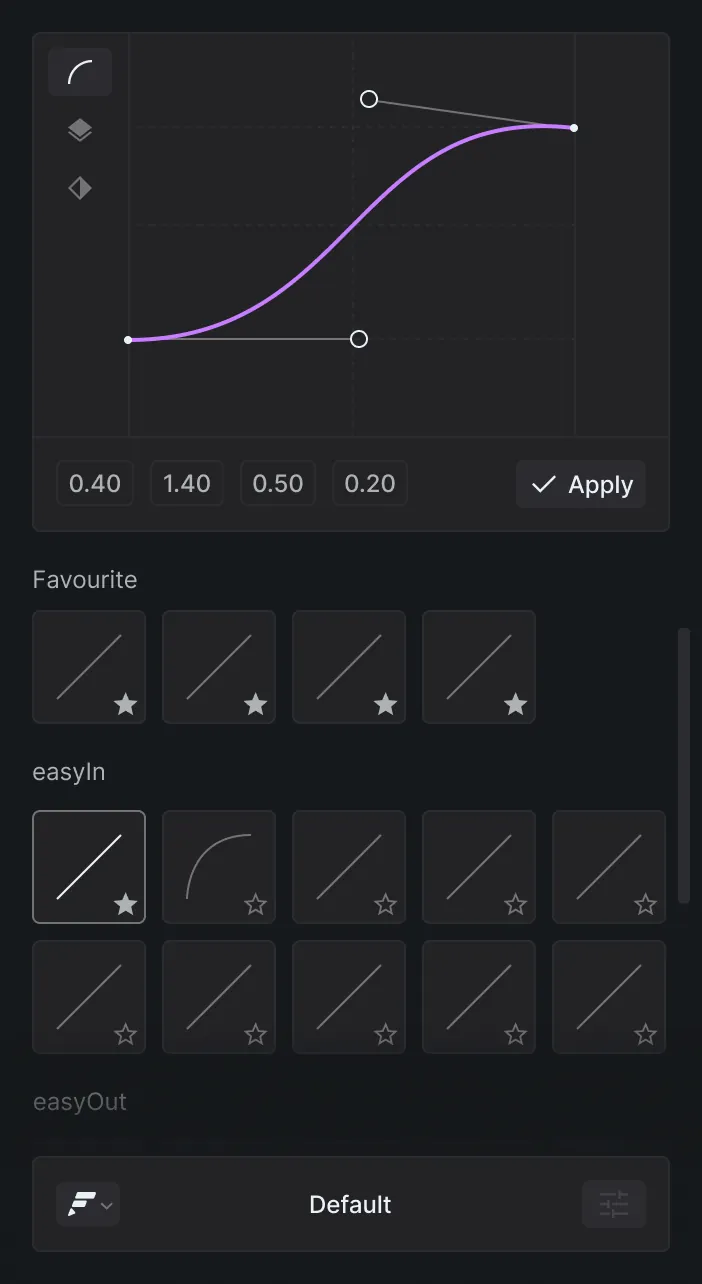
What Flexile does not do: it runs only in After Effects, while each of the other tools in this post also works in Premiere Pro. It needs an account and a sign-in, and it is under active development.
Motion Bro: a free panel with packs you buy once
The Motion Bro plugin is free and runs in After Effects and Premiere Pro. The presets come in paid packs that you buy once and use in unlimited projects, with free updates. After Effects and Premiere versions are sold separately, and each pack has a personal-use and a commercial-use price.
- Ultimate Motion Bro Transitions Bundle: 39 packages and 10,000 transitions for $160 personal or $320 commercial on the home page as of September 2026, shown as reduced from $475.
- Essential Motion Bro Transitions Bundle: 23 packages and 5,330 transitions for $59 personal or $118 commercial, same page and date.
- Master Scene links presets to one scene, so you control their effects from one place. Presets adapt to horizontal, square and vertical formats.
- One purchase code per user, usable on two devices. Projects work without the plugin installed.
- Anyone can build and sell Motion Bro-compatible packs, with no commission.
- After Effects 2021 or newer, with 2022 or newer recommended, and Premiere Pro 2022 or newer (Motion Bro technical requirements).
Animation Composer vs Motion Bro
Both are free panels for After Effects and Premiere Pro, and projects made with either open without the plugin. The difference is how you pay for a bigger library. As of September 2026:
- Free tier: Animation Composer includes over 1,000 assets. The Motion Bro plugin is free, and its presets come in paid packs.
- Paying for more: Animation Composer is a subscription with over 6,000 assets, $19.90 a month or $198 a year. Motion Bro packs are bought once, with a personal and a commercial price.
- Commercial use: allowed on Animation Composer’s free plan. Motion Bro sells a commercial-use price for each pack.
- After Effects version: 2025 or newer for Animation Composer, 2021 or newer for Motion Bro (2022 recommended).
- Computers: Animation Composer allows two signed in at a time, and a Motion Bro purchase code works on two devices.
If you want a Motion Bro alternative, Animation Composer, AEJuice and Spotlight FX are the closest: each is a free panel with a paid library.
AEJuice: free Pack Manager, lifetime bundle or subscription
AEJuice Pack Manager is a free plugin that installs, organises and previews AEJuice tools inside your editor. You need a free AEJuice account but no card. It runs on Mac and Windows, and AEJuice lists 16 supported editors, including After Effects, Premiere Pro and DaVinci Resolve. As of September 2026:
- Free library: 35 free products and 10 courses, with 2,000+ assets and 576 sound effects. The AI tools include 10 free minutes a month.
- I Want It All Bundle: $149 once for 133 packs and 20,000+ assets, with a 14-day money-back guarantee (AEJuice home page).
- All Access, billed yearly: Creator $90 a year (25 downloads), Pro $240 a year (100 downloads) or Studio $468 a year (unlimited downloads) (AEJuice All Access pricing).
- All Access covers up to two computers, and one-time licences you already own stay yours.
Spotlight FX: a free plan and a yearly subscription
Spotlight FX is a plugin for Premiere Pro and After Effects. You double-click a transition, text or effect to add it to the timeline, then change its colours, text and timing in the built-in editor. On the Spotlight FX pricing page, as of September 2026:
- Free plan: 90 of the 3,454 assets and 5 of the 57 plugins.
- Subscription: $144 billed every 12 months for all 3,454 templates, 57 plugins and 10 tools, with commercial use.
- A pay-once plan with a year of updates is also listed. Check the page for its current price.
- Paid plans come with a 14-day money-back guarantee.
- The pages we read do not state a minimum After Effects version or operating system.
Transition Master 2: transitions in four apps
Transition Master 2 Pro by ilumy design and reduxFX is a transition plugin for After Effects, Premiere Pro, DaVinci Resolve and Nuke. You can create, export and sell your own transitions, or pick from its preset library. On aescripts, as of September 2026:
- Pro: $89 once, with a free trial.
- Transition Master 2 Basic: free, limited to 5 free preset packs or packs exported from Pro. Extra preset packs are sold separately.
- Windows and macOS. The compatibility table lists After Effects up to 2023, so check with the developer before you buy for a newer version.
Which alternative fits your work?
- You want to own your presets: Motion Bro packs, the AEJuice lifetime bundle, Spotlight FX’s pay-once plan and Transition Master 2 Pro are one-time purchases.
- You animate most things yourself: Flexile puts easing, text animation, quick tools, beat keyframes, subtitles and an AI connection in one panel, with a smaller transitions library.
- You prefer a subscription: Animation Composer’s paid plan, Spotlight FX’s yearly plan and AEJuice All Access (Creator and Pro limit downloads) are subscriptions.
- You edit in other apps too: AEJuice lists 16 editors, and Transition Master 2 also runs in DaVinci Resolve and Nuke.
Is there a free alternative to Animation Composer?
Yes. The Motion Bro plugin is free (its packs are paid), and Flexile is free during its beta, not forever: paid plans will be announced in advance. AEJuice Pack Manager comes with a free library, Spotlight FX has a free plan and Transition Master 2 Basic costs nothing. For more options, see our list of free After Effects plugins.
Try Flexile
Flexile runs in After Effects 2025 or newer on macOS and Windows and is free during beta. Subtitles need a Mac (Intel Macs need AVX2) or a 64-bit Intel or AMD Windows PC with SSE4.2 and the Microsoft Visual C++ runtime. Windows on ARM is not supported. Beat keyframes run wherever Flexile runs. The seat rule from the pricing FAQ: “Two computers, but only one person may use the account.”
Related posts
Best free After Effects plugins (2026)
Plugins that cost nothing on their official pages in September 2026, the free tiers of the big preset libraries, and tools that are often listed as free but are paid.
BeatEdit alternatives for After Effects: Flexile, Sound Keys and free tools
BeatEdit compared with Flexile, Trapcode Sound Keys, BeatMarker AE and After Effects’ own Convert Audio to Keyframes: what each one writes, what it costs and when BeatEdit is still the right pick.
Best AI plugins for After Effects (2026)
AI plugins for After Effects that add an AI assistant, let Claude and Cursor work in your comps, generate images and video, or make depth maps and captions. Prices and versions from each official page, September 2026.