Clearer notes, text presets and a free tool library
Every action now ends with one note that says what happened, and the Text and Audio pages tell you what to select. Copy text presets and free expressions and scripts from flexile.io into the panel. And after an update, Flexile shows what’s new, step by step.
By Filip Miernik
v0.18.1
4 min read
In a nutshell
One note per action
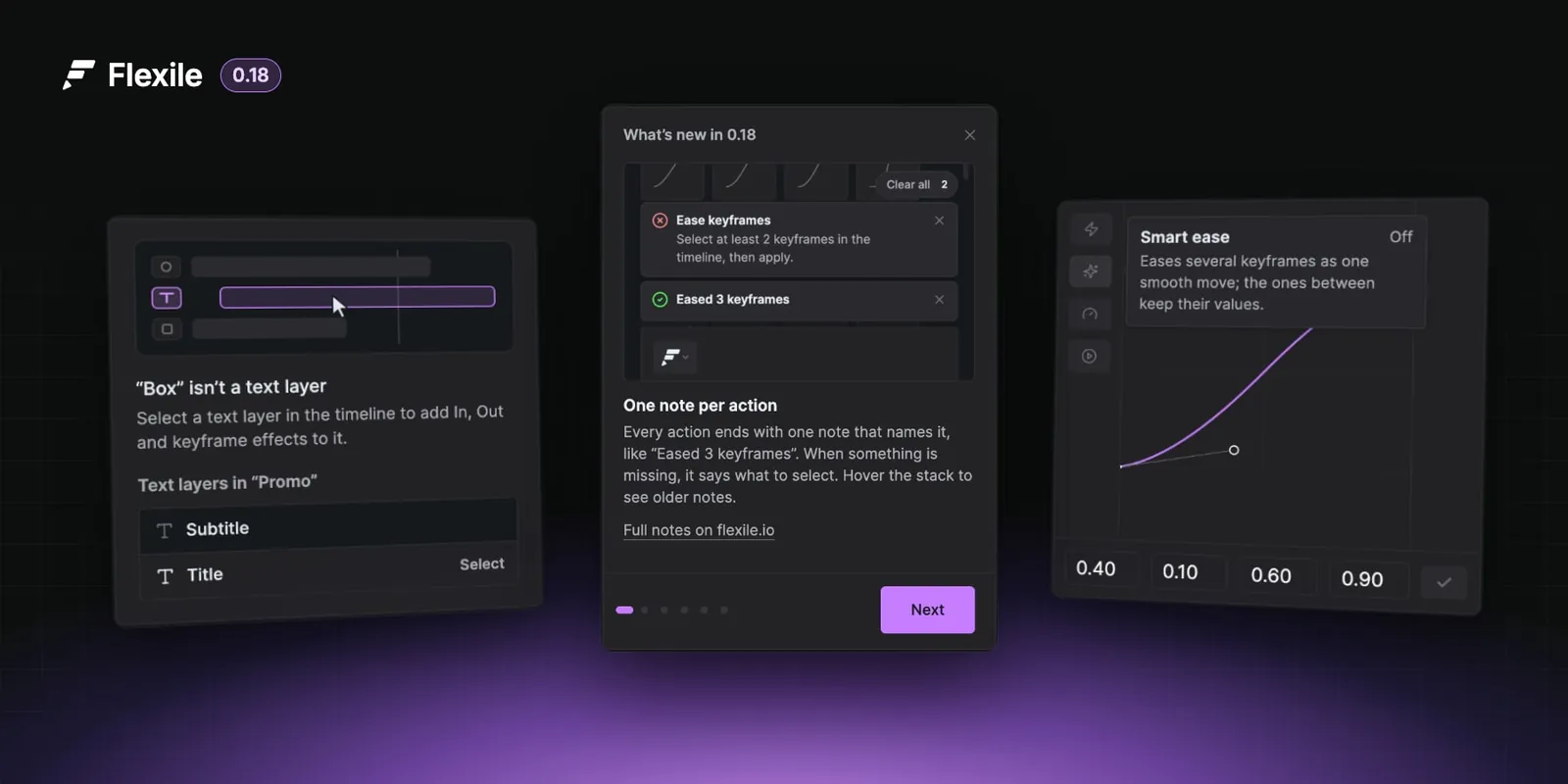
Every action ends with one note that names it, like “Eased 3 keyframes”. When something is missing, it says what to select. Hover the stack to see older notes.
Text and Audio say what to select
Until the right layer is selected, the page says why and lists the comp’s layers. Click one to select it in After Effects.
Text presets on flexile.io
Copy a preset on flexile.io, then paste it on the Text page with Options → Paste from clipboard. Paste now restores every group, keyframe and setting.
Free expressions and scripts
Add tools from flexile.io’s free library to your Cloud Tools, then press Refresh on the Tools page. Tools now hold up to 5,000 characters.
Tooltips on the curve toolbar
On the Animation page, hover Peak keyframe, Smart ease, Speed graph, Motion preview or Apply to see what it does.
And a round of fixes
Overshoot, Bounce, Flicker and Wiggle say when nothing took the expression, Invert Layer Order works again, and updates no longer clash with tutorial downloads.
Flexile 0.18.1 is out. The panel installs it on its own after a short countdown and asks you to restart After Effects; after the restart it shows what changed in a few steps. This page has the full notes.
One note per action
Every action in the panel now ends with one note, named the way you know the action: “Eased 3 keyframes”, “Wiggle added to 1 property”. Before, a failed Apply could show “No keyframes selected” and “Action completed.” at the same time.
- When something is missing, the note says what to select or do: “Ease keyframes: Select at least 2 keyframes in the timeline, then apply.” Function names never show.
- Notes stack instead of piling up. The newest is in front with the edges of two older ones behind it. Hover the stack to fan it out, Clear all removes them, and Escape closes the front one. A note that repeats counts up (×3).
- About 120 messages in the panel and in its After Effects scripts were rewritten to say what is wrong and what to do.
- Settings → Confirm finished actions turns the success notes off. Problems always show.
Text and Audio say what to select
The Text page stays locked until exactly one text layer is selected, and says why: nothing is selected, “Box” isn’t a text layer, or several text layers are selected. It lists the comp’s text layers. Click one and Flexile selects it in After Effects, as if you had clicked it in the timeline.
The Audio page uses the same prompt for every empty state: no composition, no sound in the comp, nothing selected, or a read error. It lists the comp’s sound layers and the whole-comp mix, one click each.
- The “Please select the correct text layer” alert that appeared at the wrong moment is gone.
- A quick change of selection no longer leaves the previous layer’s effects on the Text page.
Text presets on flexile.io
flexile.io/text-presets has ready-made text animations made with the Flexile text animator, each with a clip rendered in After Effects from exactly what its Copy button gives you. Copy one, then on the Text page open Options → Paste from clipboard and Save. The Text page links there: Browse text presets on flexile.io.
Paste now restores everything a copy holds:
- every animator group, including the ones after a Fill or Stroke Color, Stroke Width, Character Offset, Line Spacing or Anchor Point effect, which used to stop the paste;
- keyframed effect values, zero values (Time, Offset, Power) and the Overshoot amount;
- the ease of every keyframe.
Free expressions and scripts
flexile.io/expressions-and-scripts is a free library of After Effects expressions and scripts. Add a tool to your Cloud Tools there, then press Refresh on the Tools page: the new tool flashes once and a note says how many arrived.
- Cloud tools now hold up to 5,000 characters of code, up from 1,000.
- When a Script tool fails, its error shows in a note instead of nothing happening.
- The Tools page links to the library at the bottom: Browse free tools on flexile.io.
Tooltips on the curve toolbar
On the Animation page, hover Peak keyframe, Smart ease, Speed graph, Motion preview or Apply to see what it does and whether it is on. The tooltips stay inside the panel at every interface size, from 75 to 200 %.
What’s new, in the panel
From this version on, the first time the updated panel opens it shows what changed in a few steps, once, when nothing else needs the panel: not during the onboarding tutorial, an update or an AI run. Open it again in Settings → About → What’s new. The full notes stay here, on the changelog.
Fixes
- Overshoot, Bounce, Flicker and Wiggle say when no property took the expression, instead of reporting success.
- Move on Timeline asks for two layers instead of failing, and Invert Layer Order works again.
- Overshoot and the other animation tools, Move on Timeline, Quick Connector and Text Box no longer leave After Effects’ undo group open when they stop early.
- An update and a tutorials download running at the same time no longer break each other, and a download that ends early is caught before it is unpacked.
- Easing a 2D layer whose Position dimensions are separated no longer fails on the empty Z dimension.
- Experience points are counted again in After Effects 2022.
- Typing and pasting into a feedback survey in the panel reaches the survey, not After Effects.
- A wrong password, a lost connection or a server that is down shows as such; Flexile no longer reports them to us as bugs.
- After an update, the panel says to restart After Effects to use the new version, and no longer downloads it again each time the panel opens until then (new in 0.18.1).